
From Product Photos to Marketplace-Ready Listings: How Simple Sellers Works

Creating an effective product listing takes time. Sellers must identify key details, select categories and item specifics, write marketplace-appropriate copy and choose an asking price.
Simple Sellers is an AI marketplace listing generator that turns product photographs and seller-supplied details into editable drafts for popular e-commerce marketplaces used by UK sellers. You remain in control: review every field before saving and copying it to your chosen marketplace.
Challenges of Creating Product Listings
A reseller preparing several products for Amazon, eBay, Vinted, Facebook Marketplace or Gumtree may need to:
- Research the product and review comparable listings.
- Understand marketplace fields and current requirements.
- Identify the information buyers are likely to need.
- Choose suitable search terms, keywords and tags.
- Write the title, description, features and item specifics.
- Consider an appropriate asking price.
Simple Sellers brings these steps into one streamlined workflow, helping you move from a product photo to an editable listing draft more efficiently.
How to Use Simple Sellers
Simple Sellers helps sellers create clear, structured listing drafts without writing every field from scratch. Here is how it works:
1. Upload or Take a Product Photo
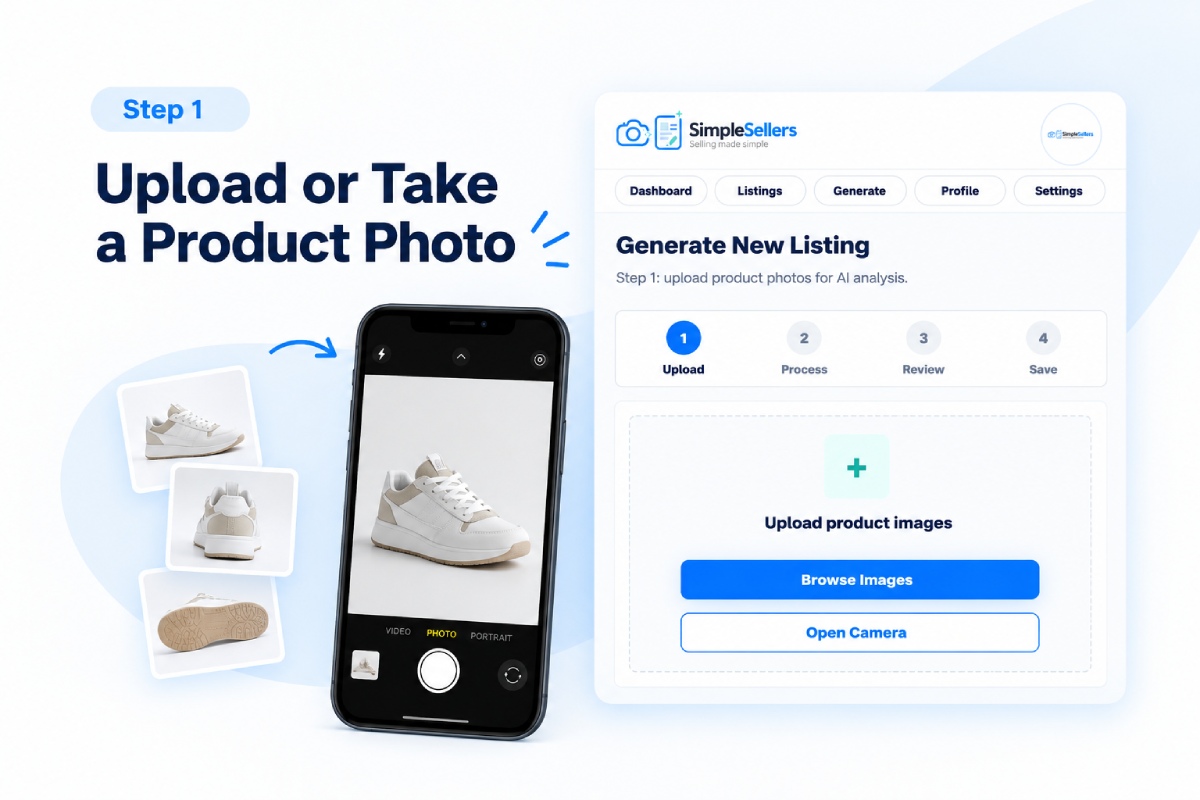
Upload one or more product photographs from your device, or take them directly using your phone.
- The front of the product
- Its condition
- Brand, size, or label details
- A clean, uncluttered background
2. Select the Product Condition
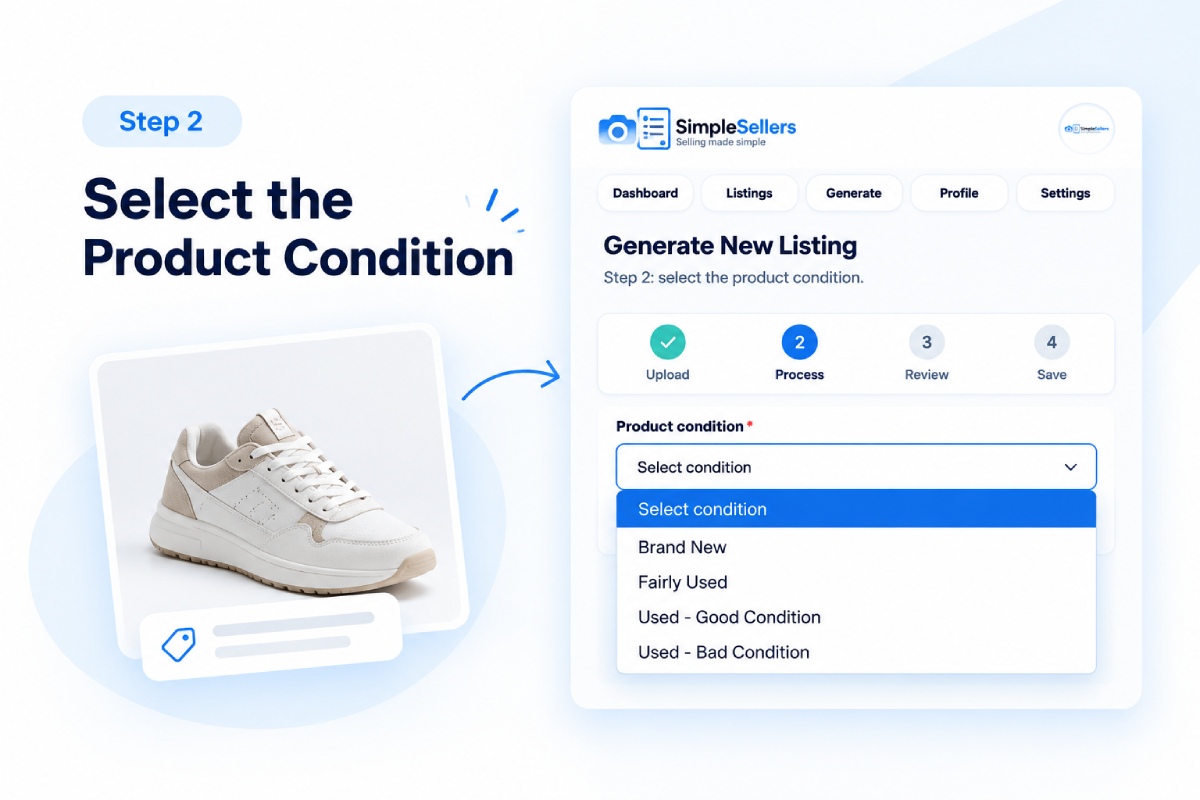
Select the available condition option that most accurately describes your product. Check the wording again before using the draft on your chosen marketplace, as marketplace condition categories may differ.
3. Add Extra Product Details
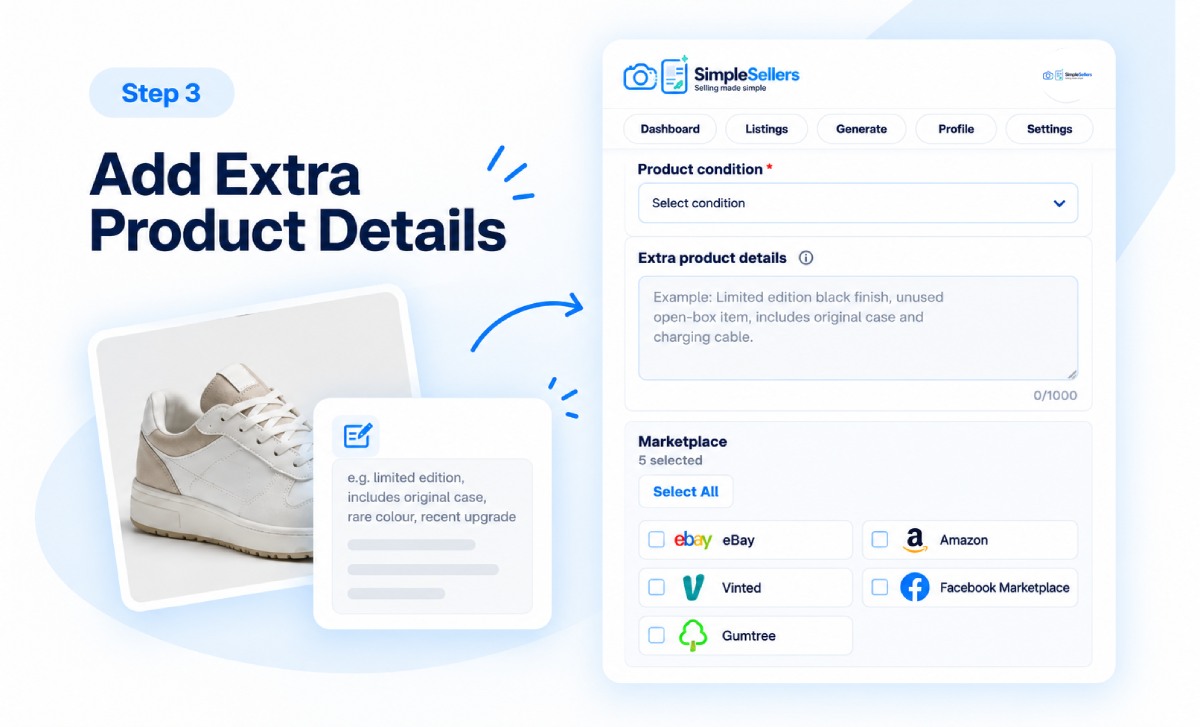
Add any information that may not be clear from the photographs, such as measurements, material, included accessories, a rare colour, a limited-edition detail, a recent upgrade or a specific flaw. This step is optional, but accurate additional detail can improve the quality of the generated draft.
4. Choose Your Marketplace
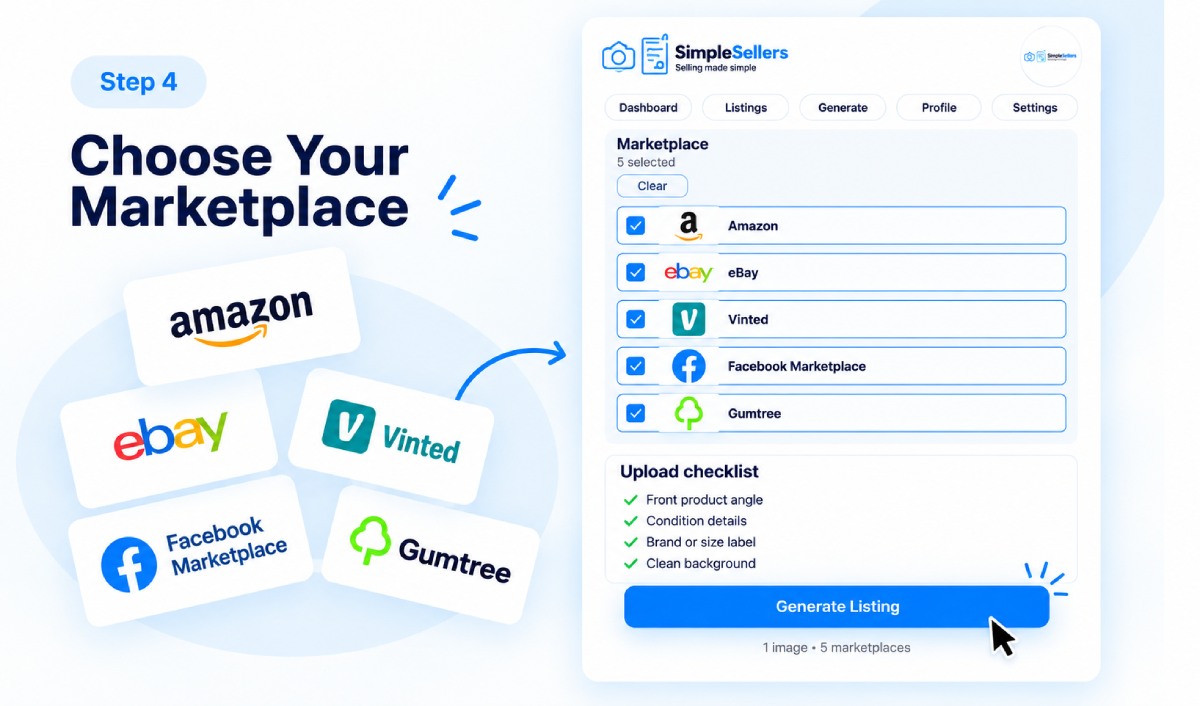
Select where you plan to use the listing:
- Amazon
- eBay
- Vinted
- Facebook Marketplace
- Gumtree
You can select one or more supported marketplaces at once. Simple Sellers tailors the structure and wording of each draft for the selected marketplace. Marketplace requirements can change, so always check the current rules before publishing a listing.
5. Let Simple Sellers Create Your Listing
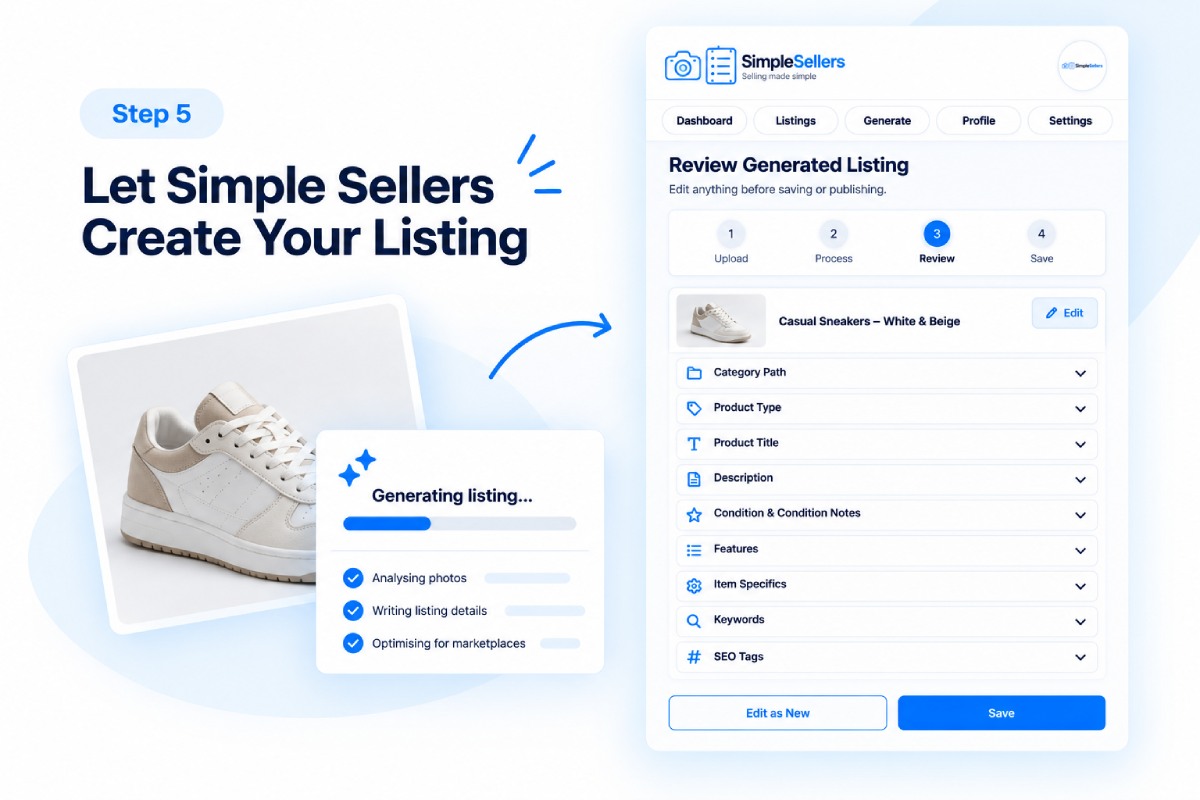
Select 'Generate Listing' and Simple Sellers will produce an editable listing draft that may include:
- Category path and product type;
- Product title and description;
- Condition and condition notes;
- Features and item specifics; and
- Keywords and SEO tags.
Depending on the product information available, Simple Sellers may also suggest attributes such as colour, finish, shape, pattern, intended use and relevant visible text.
Seller check: AI-generated information can be incomplete or incorrect. Verify every material fact against the product, its labels and the current marketplace requirements before using the draft.
Simple Sellers currently supports saving and copying listing drafts; it does not publish directly to marketplaces.
6. Check the Market Price References
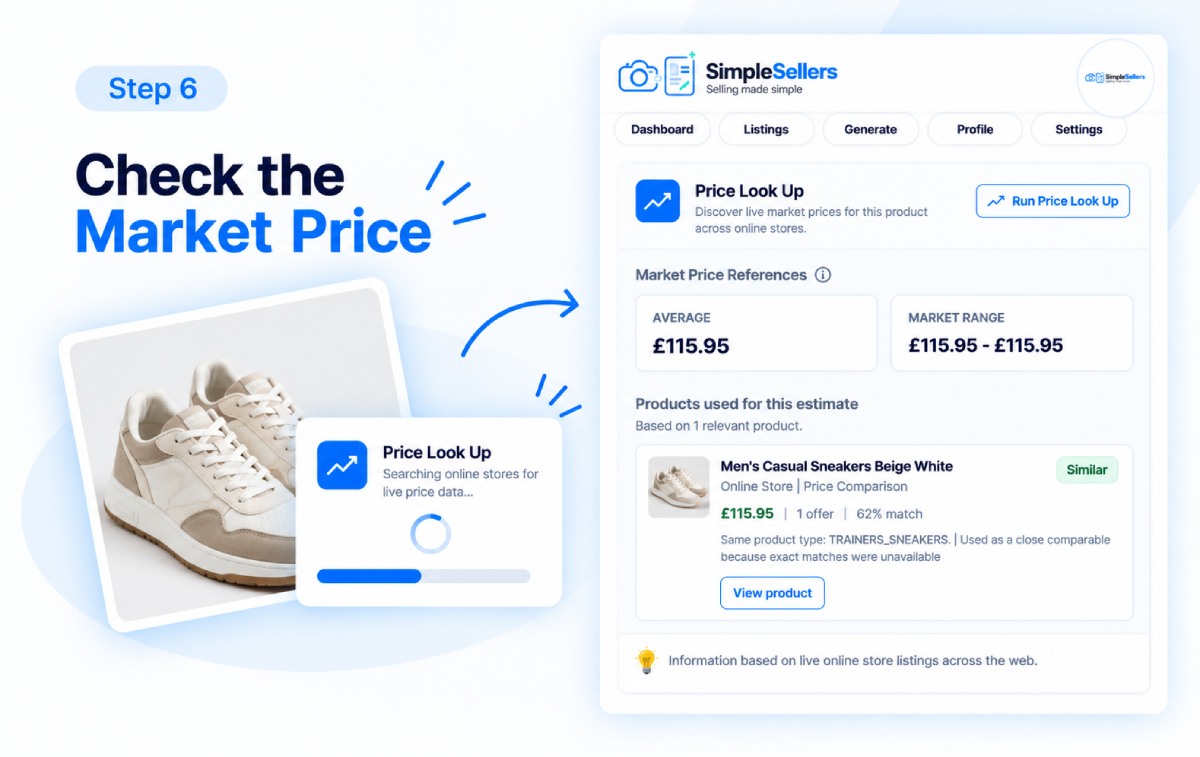
Use Price Look Up to find the same or similar products currently available online and review their listed prices.
Select Price Look Up to search for relevant product listings. Simple Sellers provides Market Price References, including:
- Average
- Market Range
The results may include similar products when an exact match is not available. You can also review the products used for the price reference, including their listed prices and other available information.
These figures are market price references based on available product listings. They are not confirmed sale values, professional valuations or guarantees of what your product will sell for. Actual selling prices may vary depending on factors such as condition, model, demand, location, postage and marketplace fees.
You decide the final price used in your listing.
7. Review and Refine Your Listing
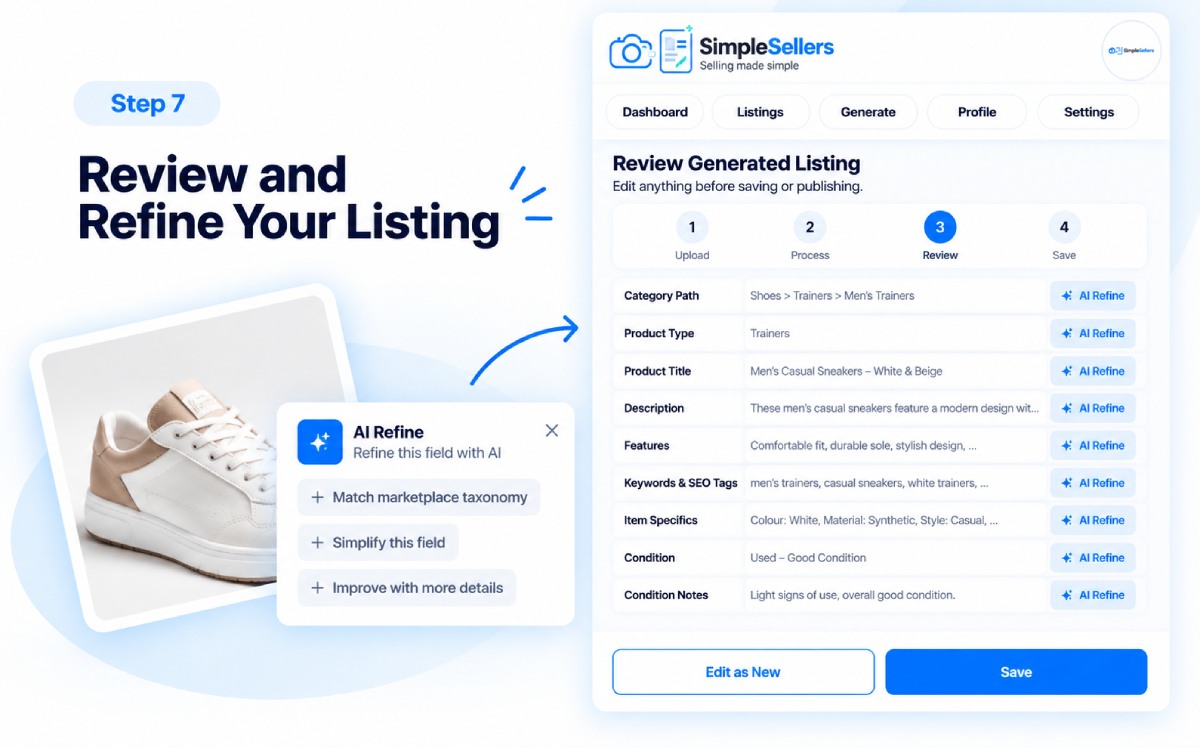
Use the AI Listing Assistant to review the generated draft. AI Refine can revise individual listing fields.
You can focus on fields including:
- Description and features;
- Keywords and SEO tags;
- Item specifics;
- Condition and condition notes;
- Category;
- Product type.
Review the revised wording carefully and make any manual changes needed to ensure it accurately reflects your product.
8. Save and Copy Your Listing
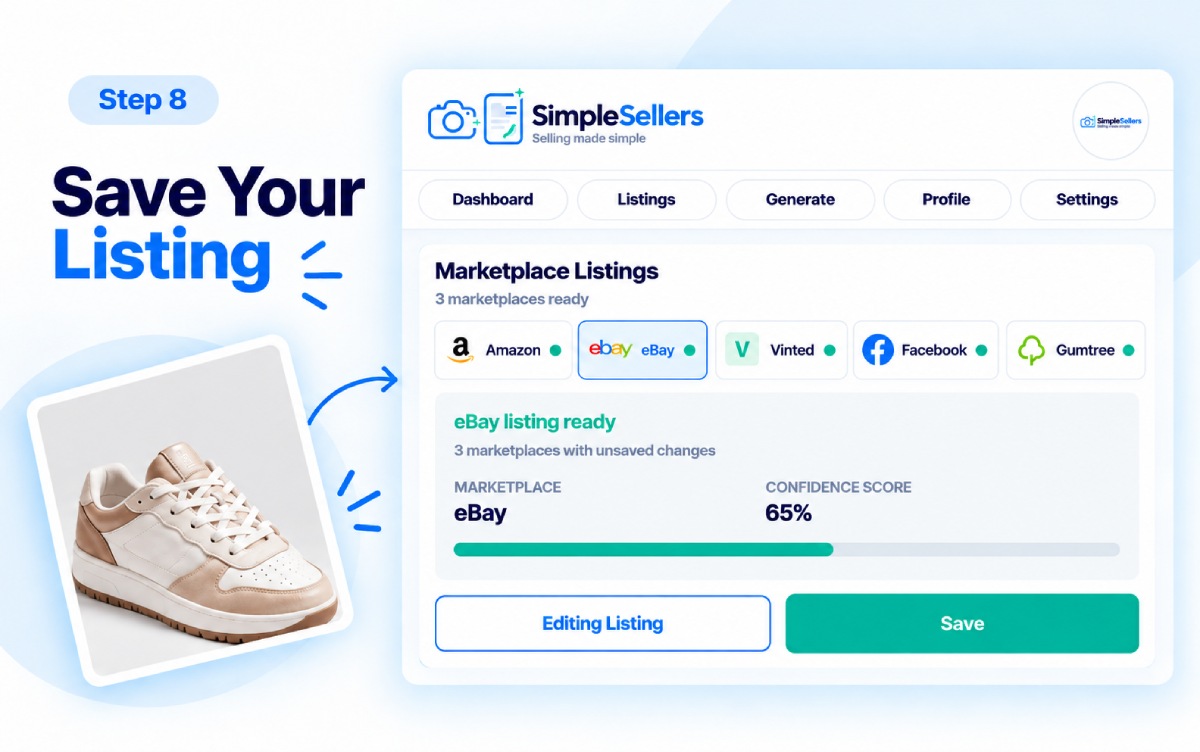
Before saving, review the Confidence Score. It indicates the system's confidence in the generated draft based on the product information available. It is not a prediction of marketplace acceptance, search ranking, views or sales performance.
Make any final edits and save the listing. Saved listings can be revisited and edited whenever needed. When you are satisfied with the output, copy it to your chosen marketplace.
Trademark notice: Amazon, eBay, Vinted, Facebook Marketplace and Gumtree are trademarks of their respective owners. Simple Sellers is not affiliated with, endorsed by or sponsored by these marketplaces.
Conclusion
Simple Sellers helps turn product photographs and seller-supplied details into editable listing drafts for Amazon, eBay, Vinted, Facebook Marketplace and Gumtree. It handles more of the repetitive groundwork while keeping you in control of reviewing, correcting and refining the content.
The result is a clearer route from product photo to a structured draft that you can save and copy to your chosen marketplace.
FAQs (frequently asked question)
Q1. How does Simple Sellers work?
Simple Sellers turns product photographs and seller-supplied details into an editable listing draft. You can review, correct, refine, save and copy the draft to your chosen marketplace.
Q2. Which marketplaces do you support?
Simple Sellers currently creates listing drafts for Amazon, eBay, Vinted, Facebook Marketplace and Gumtree.
Q3. Does Simple Sellers publish listings directly to marketplaces?
No. Simple Sellers currently generates editable listing drafts that you can review, save and copy to your chosen marketplace.
Q4. How accurate are the generated listings?
Accuracy depends on the quality and completeness of the photographs and details provided. AI-generated information may be incomplete or incorrect, so you should review and correct every draft before using it. Simple Sellers does not guarantee that generated information will be error-free.
Q5. How does Simple Sellers estimate an indicative market price?
Simple Sellers' Price Look Up compares available prices for the same or similar products online and provides an Average and Market Range. These are market price references, not confirmed sale values or guarantees of what your product will sell for.
Q6. What does the Confidence Score mean?
The Confidence Score indicates the system's confidence in the generated draft based on the product information available. It does not predict marketplace acceptance, search ranking, views or sales.